Shared Grocery List · Free Web & Android App
A shared grocery list for households that actually stays in sync
One list everyone can add to, live across every phone in the house. No more duplicate buys, no more "did you already get milk?" texts. Add by typing or voice, check off while you shop — and when you get home, move it all to your inventory in one tap.
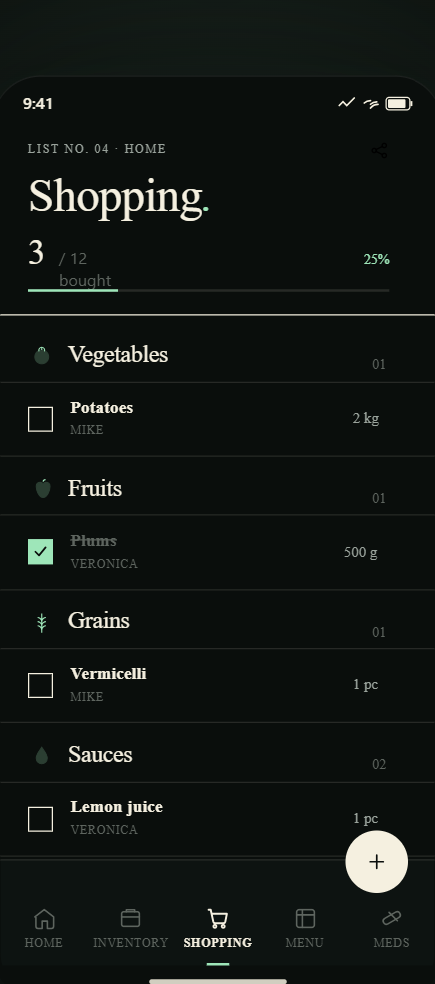
Real-time sync
If your partner adds milk while you're at the store, you see it immediately
The grocery list is shared across all household members and syncs in real time — no refresh, no polling, no "did you update the list?" texts. One person types, everyone sees it.
- Real-time sync across all household devices
- Each item shows who added it
- Check off items while shopping — crossed out for everyone
- Checked items stay visible until you clear them after shopping
Smart adding
Type it, say it, or let your expiring inventory suggest it
Adding to the grocery list should take under 5 seconds. Expireless gives you three ways — typed, voice, or straight from your inventory when something runs low or expires.
- Type: search-as-you-type from your product history
- Voice: tap the mic and say what you need — hands-free, works while cooking
- From inventory: tap "Add to list" on any item that's running low or about to expire
- Categories auto-assigned so your list is grouped by store section
Grocery list · 8 items
added by Alex
from expiring inventory
added by you · voice
Shopping done
6 of 8 items checked off
Transfer to inventory
Move 6 checked items to your fridge & pantry with expiry dates filled in
Fridge: +4 items · Pantry: +2 items
After shopping
One tap to move everything from your cart to your pantry
When you get home, tap "Transfer to inventory." Every checked item moves to your pantry with its storage location and default expiry date already set. Your inventory updates in seconds — no duplicate entry.
- All checked items transfer in one tap
- Storage location assigned automatically: dairy to fridge, canned goods to pantry
- Expiry dates pre-filled by category — adjust anything before confirming
- Unchecked items stay on the list for next time
Family Members add-on
Add kids, grandparents, or roommates — they don't need a subscription
Not everyone in your household needs full Pro access. The Family Members add-on ($2.99/month) lets you invite up to 5 people with a simplified view: they see the grocery list, can check off items, and receive reminders — without access to account settings or the full inventory editor.
- Up to 5 family member accounts per add-on
- Read and contribute view: see list, check items, add to list
- Receive medicine reminders assigned to them
- Cannot edit inventory, settings, or billing
- Works on top of Pro or Family plan
Your household
Alex
Owner · Pro
Sam
Member · shared access
Emma (kid)
Helper · list & reminders only
Shared grocery list FAQ
How do I invite someone to share the grocery list?
From the app, go to household settings and tap "Invite member." One tap generates a shareable link. Send it by text, WhatsApp, email — however you like. When the other person opens the link and has Expireless installed, they join your household automatically. Takes about 30 seconds.
Does it sync in real time while we're both at the store?
Yes. Any change — adding an item, checking something off, deleting — appears on all household members' screens within seconds. No manual refresh required. If your partner adds oat milk while you're already in the dairy aisle, you'll see it before you reach for the regular milk.
Can I add items with my voice?
Yes. Tap the microphone button and say what you need. Works well for quick adds while your hands are busy: cooking, in the car, unpacking the fridge. Expireless recognizes product names and adds them to the list with category and storage location pre-filled. Voice input requires Pro.
What happens to checked-off items when I get home?
Tap "Transfer to inventory." All checked items move from your grocery list to your pantry inventory — with storage locations and default expiry dates filled in automatically. The list clears the checked items and keeps any unchecked ones for next time.
Can I give someone read-only access?
Close to it. With the Family Members add-on ($2.99/month), invited members get a contribute view: they can see the grocery list, check off items, and add to it, but they can't edit the inventory or account settings. Perfect for kids who shop but don't manage the household.
One list. Zero confusion.
Free to download · Household sharing on Pro · $4.99/month