Pantry Inventory App · Free Android App
A live pantry inventory that updates itself
Most pantry apps fail because keeping them up to date is more work than just opening the fridge. Expireless solves this: scan a receipt and your entire grocery run is logged in one photo. No manual entry, no stale data.
Inventory overview
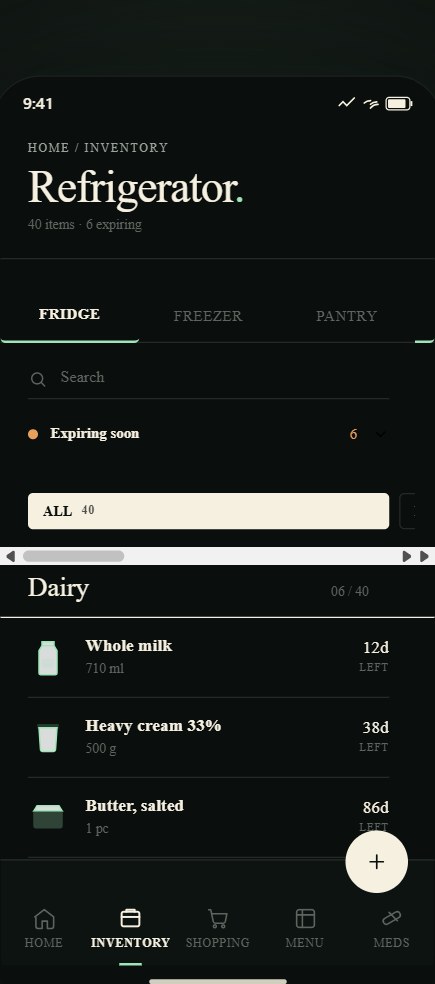
Fridge, freezer, and pantry — each with its own view
Expireless organizes your kitchen inventory into separate tabs so you're never scrolling through frozen chicken to find your pasta. Each storage location has its own inventory, sorted by what expires first.
- Fridge, freezer, pantry, and medicine cabinet — all separate
- Items sorted by expiry date automatically — most urgent at the top
- Search by name or filter by category
- See total item count and estimated food value per location
Fast entry
The only pantry app that fills itself in
The reason most pantry inventory apps get abandoned: they require you to manually add every item every time you go shopping. Expireless's receipt scanner eliminates that entirely. One photo of a grocery receipt adds 20–40 items in under 30 seconds.
- Receipt scanning: one photo adds your entire grocery run
- Manual add: type a name and Expireless fills in the category and expiry
- Voice input: say what you bought and it's added
- No barcode scanning required — receipt photos are faster
Your locations
Multiple locations
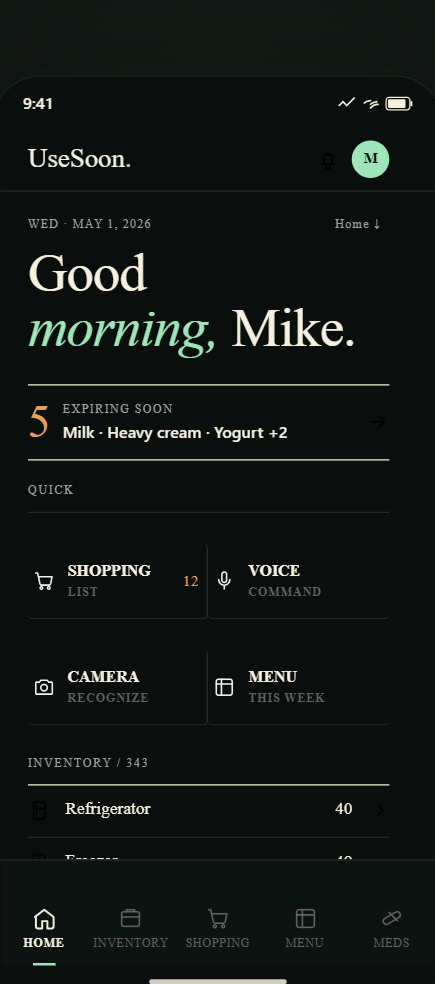
Home, cabin, office — managed from one app
If you have a second home, a cabin, a vacation place, or an office fridge, you can manage all of them from the same Expireless account. Each location has its own separate inventory and its own expiry alerts.
- Add as many locations as you need (Pro feature)
- Switch between locations with one tap
- Each location has its own fridge, freezer, and pantry
- Expiry alerts are sent per location — no cross-location confusion
Connected to shopping
When something runs out, it goes straight to your grocery list
Your pantry inventory and your grocery list are connected. When you log an item as used up, or when something expires, you can send it to the shopping list with one tap. Shared with your household in real time.
Pantry inventory app FAQ
Do I have to manually update the inventory every time I use something?
You swipe and tap — one gesture to log an item as used or discarded. It's not automatic (no app can see inside your fridge), but it's designed to take under 5 seconds per item. Most users update after unpacking groceries and after cooking. Receipt scanning keeps the add step instant; the usage logging is the only manual part.
Can I add more than one pantry or fridge location?
Yes. Expireless supports multiple locations: home, cabin, office, vacation house — each with its own fridge, freezer, and pantry inventory. Switch between locations with one tap. Multiple locations are a Pro feature.
Does the inventory sync across multiple people's phones?
Yes, on the Pro plan. Invite household members with one link. Everyone in the household sees the same live inventory. Changes sync in real time — if your partner removes the last of the milk, it's gone from your view immediately.
What if I bought something without a receipt?
Tap the add button, type the item name, and Expireless fills in the category, storage location, and default expiry date automatically. For most items it's three taps: name → confirm category → save. You can also use voice input to add items hands-free.
How is this different from a notes app or a spreadsheet?
Notes and spreadsheets require 100% manual work and give you nothing back: no sorting, no expiry alerts, no household sync, no understanding that broccoli goes in the fridge and pasta goes in the pantry. Expireless is purpose-built: fast entry via receipt scanning, automatic categorization, daily expiry alerts, and real-time household sync. It's designed to stay accurate without constant effort.
Know exactly what’s in your kitchen
Free to download · Pro from $4.99/month · No credit card needed
Get it on Google Play